Breaking News

IP

Showing posts with label Blogger. Show all posts

Top 9 Best URL Shortener Networks To Earn Money

Earn money from shorten URL is one of the easiest method in which you do not require any skills, it is the simple method from which you can earn money online. Those persons which are don't know much about how to make money online can use this service and can make some money through this service. It is very easy process just convert your URL and promote on where you want to promote when anyone can click on your Short URL for 5 seconds it redirects on an ad then it will go on destination So it is the way company can pay you, the rates are depend on the companies because there are many different URL shortening companies which have different rates.
Companies pay maximum in between $1 to $10  per 1000 views on a URL and they have also referral system by joining other persons from your referrals and they will give you maximum 20% commission. So here we have find some URL shortening companies from which you can earn money by promoting Short URLs.


What is URL Shortening ?


In URL shortening you can convert your large URL in short URL. It is very helpful because if you want to promote any link which are very large and sometimes it become difficult for us to remember the link but with the help of URL shortening service we can convert them into short URL then we can easily remember the link. You have to just go and join URL shortening networks and take any link which you want to promote and place on the box and then click on shrink it will shrink or convert your large link into short URL which you can promote further.       


#1 Shorte.st


Shorte.st icon
Shorte.st is new URL shortening company and It will give you $2 per 1000 views for promoting Shorten URL and the minimum cash out is 5$. If your are not satisfy with payout then you can earn money from referral system It will gives you 20% commissions on referrals. Shorte.st is a user friendly and you can securely get your payment through Paypal and Payoneer. It has a good payout rates and it is a good shortening company for URL shorten. Beside this shorte.st have also affiliate programs It gives you great ads format and you can promote on your blog or website.


#2 Adfoc.us


Adfoc.us logo
AdFocus is a free short URL service.You can Get paid for links you share on the Internet. You can place links on your blog, website, social media, forums, YouTube and more. You can get 2$ to 5$ per 1000 views on your shorten URL The minimum payout is 10$ which is quite high than other URL shortening companies and you can also get commissions from referral system. It is a US based company and and gives very high rates in US and UK, So if you can click any US and UK based visitor then you will get paid high rates. It has also a advertiser programs for your blog or website.   


#3 Linkbucks.com


linkbucks logo
Linkbucks is another best and legal URL shortener website. It is the number one competitor of Adf.ly.It has great google page rank and very high alexa ranking. By promoting your Shorten URL you can get 0.5$ to 3$. The minimum payout is 10$. Linkbucks has paid out more than $1.2 Million USD. Other competitors only pay for unique traffic while Linkbucks pay for all your traffic. Advertising programs are also there, so you can advertising with linkbucks.


#4 Adf.ly


Adf.ly logo
Adfly is old and one of the best trusted company which is pays on time. You can get approx  5$ per 1000 views by promoting your shorten URL. The main thing i like Adfly is that the minimum payout is 5$ which is best than other companies. It is a trusted company and you can get your payment through Paypal. Most of the persons use Adfly because it is an old and legal, trusted company and which takes best care of their customers. 


#5 Snip.ps


Snip.ps logoSNIP.PS is a US based company. It is a new and innovative platform for earn money. You will get paid by sharing your shorten URL on social media, YouTube, websites and blogs. When persons click on your URL it will show them advertisement for 5 second and after this it will take them on the original destination and you will get paid. The SNIP.PS pays 2$ to 5$ and the minimum payout is 10$. It is the easiest way to earn money and you can easily receive your payment from Paypal. 


#6 Adlock.org


Adlock.org logo
Adlock.org is a CPA and CPM based URL shorten service. First you have to Short your URL and then you can share your URL any place, when anyone click on your URL it will show them to complete any task like completing any survey or download something etc then you will get paid if they don't complete any task don't worry you will also get paid due to CPA (cost per action). The Adlock pays 1$ to 5$ and the minimum payout is 5$. Adlock has also advertisement system so you can also try their advertisement program. 


#7 Bc.vc


Bc.vc logo
It is a modern URL shorten or a free URL shortening service. You get paid by share your links on the Internet. You can register free account and start shrinking. Every person that visits your URLs and click on your URL , you will get paid. You can Place your short urls on Social media, forums, websites and on more. It will pay you up to 4$ per 1000 visits and you can also get 20% commission from your referrals. 


#8 Linkshrink.net


Linkshrink.net logo
Linkshrink pays 2$ to 5$ and the minimum payout is 5$. Through referral system you can get 10% commission from your referral. It is the best and innovative company which pays good rates to their customers. You can register free and earn money to share your links on internet.  


#9 P.pw


P.pw logo
P.pw is a URL shorten company and easiest way to earn money online. Create an account and share your short URL on websites, blogs, social media, forums etc and you will get paid. The P,pw pays 1$ to 3$ per 1000 views and the minimum payout is 5$ which is best than some other companies. You will get paid by sharing your links on the web you can register free on P.pw and earn money online without any skills just by share your links. You can also get commission from your referrals.


I hope you like these networks. If you have any best network which i have skipped. Must leave you comment i will review and update it as soon as possible.
Read more ...

Best SEO Tips For Beginners


Best Seo tips for beginners Best SEO Tips For Beginners

1. High Quality Content

First thing about SEO is High Quality content. Your post content must be orignal not copied from other sites and you post’s content must delivers same thing that written in title of your post.for writing High Quality Content you should keep in mind the following things :-
  • Format your text use underline, bold, italics, H1, H2 and H5 etc according to need.
  • Avoid grammar mistakes, spelling mistakes.
  • Use internal links of you other related posts.
  • Include you suggestion, saying, advice in the end of each post.
  • Check and update Broken Links.
  • Use fresh content.
Quality V/S Quantity :- The quantity does not matters, the only thing matters is the “Quantity”. Many people are asking that how long the should write their post. But for  High Quality Content you should write your post in such a way the it explains all the necessary  points of your topic [ Don't consider quantity ]. 

2.  Page Title

The page title is very important factor of SEO. For SEO your all posts title must describes what you want to telling the visitor. Your page’s content must be according to your page’s title.  For page title  you must keep following things in your mind :-
  • Each page must have unique title which accurately describe’s the content of your post.
  • Your page’s title must be Brief and descriptive.
Home Page Title :-  Your Homepage’s title must include your website’s name and also use some keywords which describes your website.
Post’s Title :- As I already said that your post’s title in such a way that it accurately describes the content of your post.

3. Page/Post Link 

It is one of most important factor of SEO. Not only the page’s title your page’s link also according to your post title and focused keywords.  Just follows my example which will explains all about permanent link of your page/post.
Examples of  Bad Page/Post Link :-
  • www.example.com/In/12345.html
  • www.example.com/id=01&Action=5
  • www.example.com/trickscorner.
Examples of  Good Page/Post Link :-
  • www.example.com/tricks corner
  • www.example.com/2014/03/tricks corner

4. Meta Tag

When designing your website, each page contains a space between the tags to insert metadata, or information about the contents of your page. Meta tags are snippets of code on a web page. They offer information about a page (metadata). All meta tags but the “title” tag are invisible as a site visitor looks at your website, but meta tags can be exposed to searchers.
Title Metatag :-  The metadata is used to displayed title of your post on the top of your browser’s window. [ 70 Characters ]
Description Metatag :- The Description Metatag is very important and helpfull as it displays your text focused keyword and [ 160 Charactors ]

5. Image Alt Tag

Always insert Alt tag to you blog/site images you uploads it helps you increase traffic from the indexed images. The alt tag is the basically alternative description of your image which are shown by search engine like in Google Images. So, don’t upload your images as 1.jpeg, 222.jpeg etc. Just upload them with their short description of image which appears to user when he moves pointer on that.

6. Interlink Your Pages

The another important thing is that interlinking your blog’s pages. Interlinking means connecting you post with you website’s pages only not with external links. The use of interlink makes the user to spend more time in your website. The things to be keep in mind while using interlinking are as followings :-
  • The posts your are linking should be related to you your current post.
  • Interlink your pages by using proper keyword or by using anchor tags.
  • Do not add more than 4-5 interlinks in your post.

7. Page speed

The speed of loading your site’s page is very important it helps you increase you site rank. Fast site increases the unser interface and encourage the user to visit again on your site. In order to increase the speed of your site keep following things in your mind  :-
  • Go to http://www.webpagetest.org/ and test how many seconds your site takes for your pages to load from different locations, internet speed and browsers.  This  analysis report at the end will also tell you which components of your page take too long to load so that you can remove them or improve them.
  • Your can also use Google Page Speed Service to test your website speed and get some performance recommendations.

8. Mobile Friendly Websites

This is the another most important factor for increasing SEO. Generally most of people ignores this that the don’t makes mobile friendly websites as according to Google the average user coming from mobile devices are 40 % . So, if your site is not mobile friendly then your are surely going to loose them.  For making mobile friendly website keep following things in your mind always :-
  • Make/Use responsive design.
  • Test your site on different mobile browsers like Chrome, Firefox, Dolphin.
  • Make a app of your website.
So this is all about SEO of making website to be on first page of google search and other search engines. I hopes if you are following all these important tips then I’m sure you will get good result. If you facing any problem and needs any help then just comment it below Thanks.
Read more ...

How to Install CommentLuv on Blogger

Today I will be sharing the method “How to Install CommentLuv on Blogger Blogspot”. Blogger and WordPress both platforms are great while blogger provides all the services for free, WordPress has some of the best plugins. For WordPress users adding CommentLuv is very simple, all they need to do is just install the CommentLuv plugin. But what about those who use blogger platform?? No problem. There is a solution for blogger users too.

What is CommentLuv?

comment luv for blogger blogspot How to Install CommentLuv on Blogger Blogspot
Commentluv is basically a plugin or an add-on that first came for WordPress. It allows readers to comment on a post with their own link posted too. It creates a backlink to your blog. You get a link back to your blog posts by commenting on other blogs. So CommentLuv is one of the best commenting system used by webmasters all around the world as it attract visitors to comment.

Why Use of CommentLuv Plugin in Blogger Blogspot ?

Let me explain a bit about the commentluv and its features that make the blogs with this plugin so attractive. The main feature of this plugin, as the name implies, is to show some love to the commenters on your blog. In other words, by having the plugin on your blog you are able to reward the commenters for stopping by, reading your posts and leaving a comment.

How to Install CommentLuv for Blogger Blogspot:

Step 1) First of all Go to IntenseDebate.com and Sign up for a new account.
How to Install CommentLuv for Blogger Blogspot How to Install CommentLuv on Blogger Blogspot
Step 2) Fill up the Form as Shown in figure below:

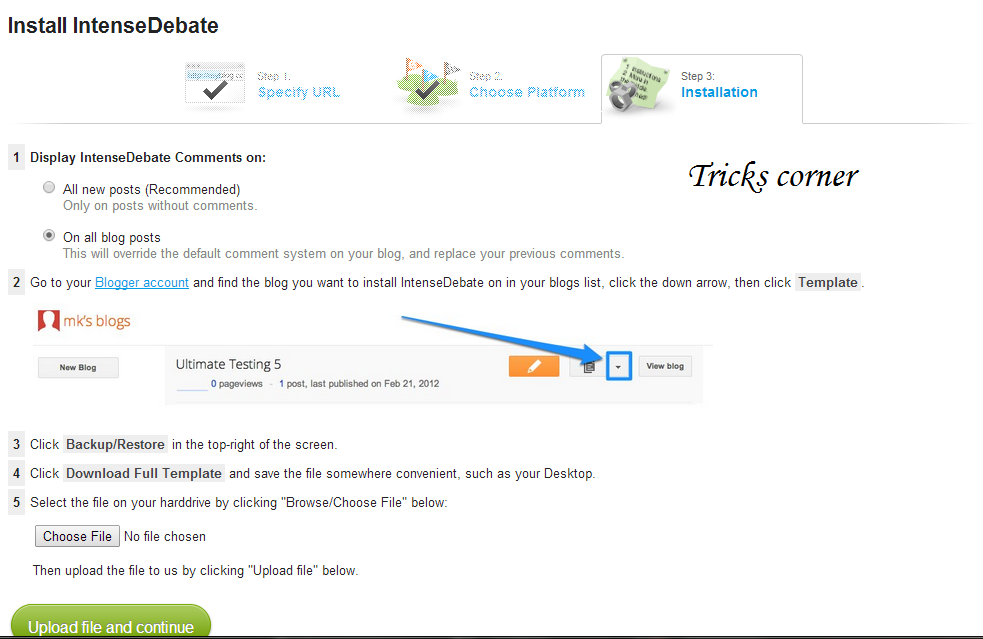
Step 3) Go To Your Blogger DashBoard Template Backup/Restore & download your blogger template.
Step 4) After downloading return back to the Upload template page and upload your template by clicking thechoose file button. Then Click Upload File and continue. As Shown below:

Step 5) After Clicking the button you will be redirected to a page containing your modified blogger template. The screen shot is provided below:
Step 6) Now copy all the code in the box by clicking on the box.
And again go to your blogger dashboard >Template and then click on edit template. Your template code will open. Then select your template code by pressing ctrl+A and then delete the whole code. Now paste the code copied from the box in intense debate. Now Click on Save template.
Step 7) Click on the link “configure this IntenseDebate account“. As shown above image.
Step 8) After Clicking on it you will be redirected to your Intense Debate account. After getting there click on the plugin tab and click on Activate. As shown below:
How to Install CommentLuv for Blogger Blogspot 7 How to Install CommentLuv on Blogger Blogspot
You are Done.!
Read more ...

Leave A Message!!

foxyform
Designed By TricksCorner